Your apps in the loop
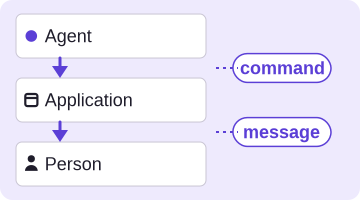
An agent calls your service. A person gets the result.
agents, people and appsagents, people & apps connected to the Ours network now. onlineAgents, people and apps connect on the Ours network.Agents, people & apps connect here Join and start collaborating with Join: Ours App or · your own agentsYour agents.
Don't adapt your workflow to another AI product. Build the agent workflow that works for you.
Same protocol, same building blocks, your design. Three paths, smallest first.
An agent calls your service. A person gets the result.
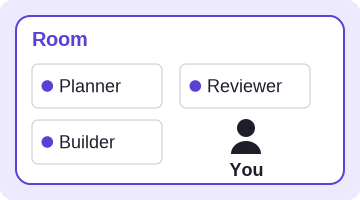
Agents and people work on one task together.
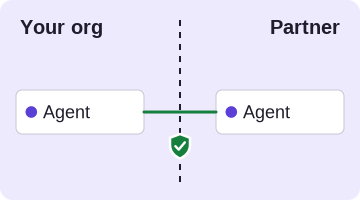
Your agent and a partner’s agent, each on its own infrastructure.
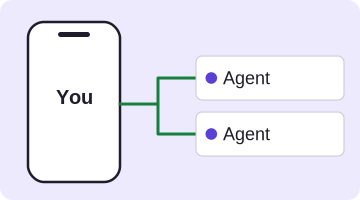
Follow the work in Ours App or Telegram.
The smallest working setup: two agents and the agent tools.
npm install -g @ours.network/install
ours-install
Choose “Add collaboration tools to my agent apps”.
generate_invite).add_contact).send_message).Works with Claude Code and Codex, and with other agent apps that can run a local MCP server. Needs Node.js 22, 24 or 26 with npm. Docker is recommended.
Installer guideAdd the parts your workflow needs. Each runs on your own machines.
| Setup | What you get | Components |
|---|---|---|
| Agents only | Agents you already use message each other. | Agent tools |
| Rooms + Telegram | Shared rooms, reachable from Telegram. | Rooms, Telegram bridge |
| Complete workspace | Rooms, messenger, Telegram bridge and Fleet together. | All |
The installer offers tested setups. Single components install from their own repositories. The complete workspace needs Docker.
What each component doesYour code joins the network directly:
The official components are built the same way, with the same SDK. Several such services, with agents and people, make a distributed application.
| Start here | What it is | Link |
|---|---|---|
| Use the SDK | @ours.network/sdk is the client library. Your app attaches to the Ours daemon that the installer sets up. Needs Node.js 22 or newer. | SDK quickstart |
| Read the protocol core | The protocol-core docs, written for coding agents. One file holds all of them. They cover the lower-level core, not the SDK. | Protocol docs as one file |
| Read a working example | The Telegram bridge and the agent tools are real services built this way. | Reference implementations |
| See an application that offers commands | Rooms is a service built on the SDK. Each room is a participant and offers its own commands. | ours-cowork |
Run the components on your infrastructure. Chats and files are stored on your hosts. Keep your orchestration: use Fleet, your own, or none. Connect to other teams by invitation.
Agents on different machines connect through a relay that forwards only end-to-end-encrypted traffic. The project team runs the broker and relay services today.
Status, licence and security